A fast running PC is desired by one and all and creating space in your PC memory is an effective way to do so. Clearing the cache is not only a superb way to make space in the computer memory but also protects you from privacy threats and unwarranted security. Don’t you have a clear idea of what this cache is? Well, you must be knowing that every detail of your web browsing is stored in the PC in cache.
Remote computer support professionals opine that an overloading of the data will result in drastic slowing down of your PC system as well as the web browser. Now, the question is what type of data is stored in cache? Image, files, text, downloaded contents and info about web pages are saved in cache. Together with internet cookies, you should also clear up this cache from time to time.
A very important thing that you should know is that the procedure of cache clearing varies with varied browsers. Are you eager to know what these processes are? The diverse processes are explained herein.
Google Chrome
This is the latest web browser in Google compiled with mane novel features. Follow the methods below and clear cache from this browser.
- Open Chrome > click Tools (the wrenched shaped tab in the browser)
- Next, click Options > choose Under the Hood from the new window > then Clear Browsing Data
- Now choose Empty the Cache > click Clear Browsing Data
- In the checklist, you are free to de-select and select the other items
- You also have the option to set a specific time period when the things will get deleted
Don’t think it’s something difficult. It is quite similar to erasing of the search history.
Mozilla Firefox
Now this browser has different versions. In case you are using the 3.5 or 3.6 versions, you can follow these instructions.
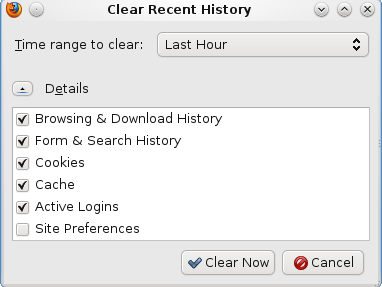
- Open up Firefox > click Tools tab > choose Clear Recent History
- Alternatively, you can also press CTRL + ALT + DEL after opening Clear Recent History
- Now, choose Everything option next to Time range to Clear
- Click Details > select Cache
- Finally click on Clear Now for cleaning up the cache.
If you are using some other version of Mozilla Firefox, you have to follow a different set of instructions. To know this, you should get in touch with the online computer services expert in the field.
Internet Explorer
When you are using the oldest browser, you have to follow these given set of instructions to clean up browser cache.
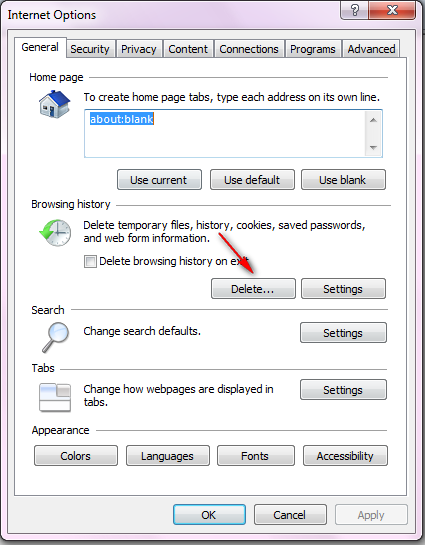
o Open up Internet Explorer > click Tools > select Delete Browsing History
o Alternatively, you can also press CTRL + SHIFT + DELETE after opening your browser. You will reach the same page as in the previous step.
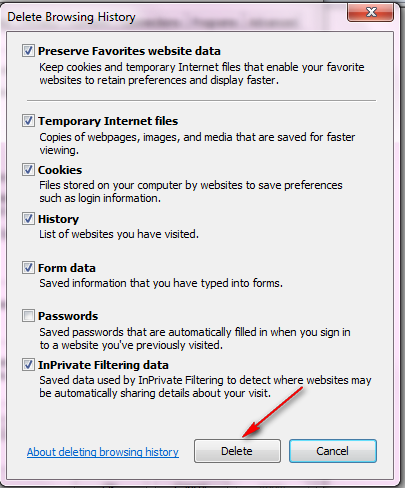
o Put check beside the option of Temporary Internet Files
o Click Delete
If you follow these methods diligently, you will surely be able to clear up the browsing cache.